
මොබයිල් ෆෝන් එකට ඩේටා කාඩ් එකක් දැම්මොත් එසැනින් ඉවර වීම සහ ඩේටා පැකේජ ඇති අයගේ නියමිත දිනට කලින් එම පැකේජ අවසන් වීම බොහෝ අයට ඇති ගැටළුවකි. එහෙත් ඩේටා ඉතිරි කර ගැනීමට ඔබගේ ජංගම දුරකථනයේ සෙටින්ග්වලින් කළ හැකි බොහෝ දේ ඇත. මේ ඒ පිළිබදව ඔබට ගෙනන කරුණු කිහිපයක්.මේ සදහා අපට අනුග්රහය දක්වන්නේ https://webtecsrilanka.com/ විසිනි.
Limit or Restrict Data by App on iPhone
Settings >> Celular Data >> turn OFF the apps you don’t want to use cellular data

Turn off Background App Refresh on your iPhone
Settings >> General >> Background App Refresh >> urn off Background App Refresh entirely by choosing Off

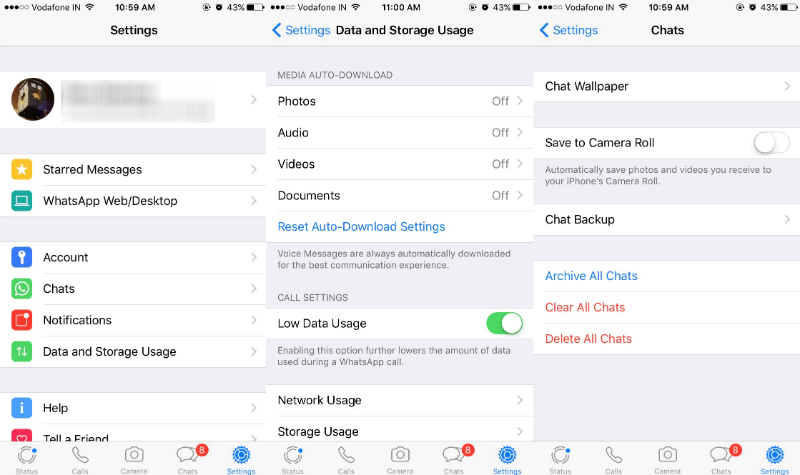
Stop Whatsapp media auto download
Open WhatsApp >> Settings >> Data and Storage Usage >> Media Auto-Download >> For Photos, Audio, Videos, and Documents, select the Never option
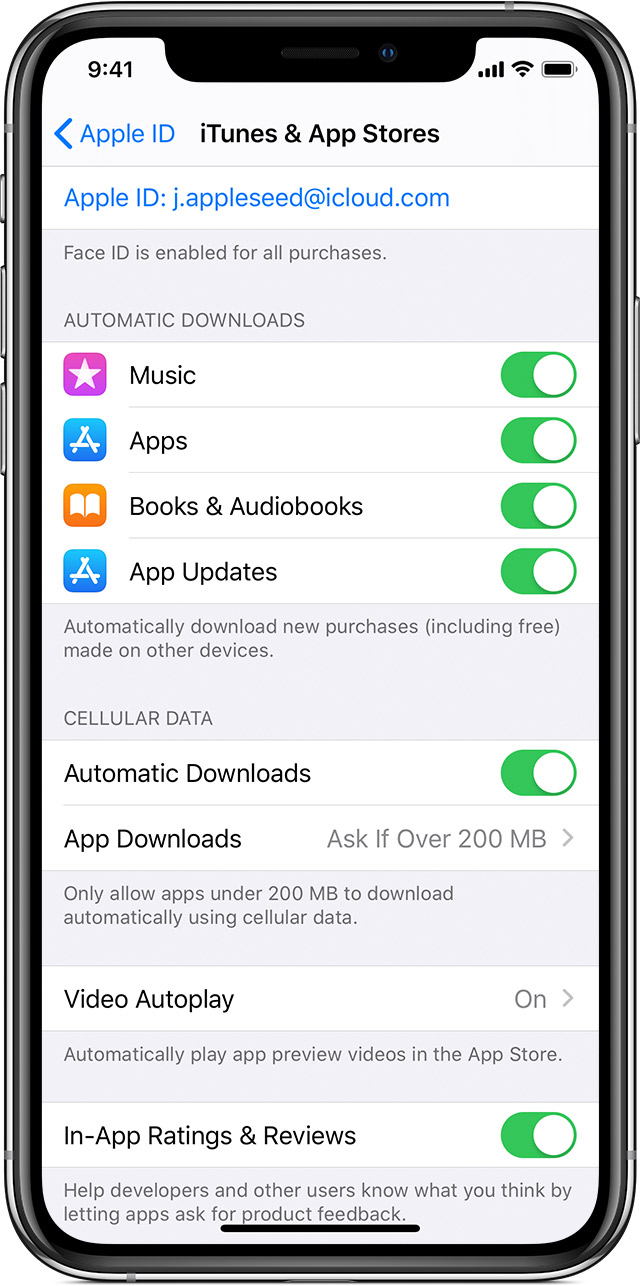
Turn off automatic App updates
Settings >> [your name] >> iTunes & App Store >> Turn off App Updates.
Disable Wi-Fi Assist
Settings >> Cellular and scroll to the bottom to turn off Wi-Fi Assist.

Download music, don’t stream
Settings >> Music >> Streaming & Downloads section >> Use cellular Data >> Tap On Downloads

වීඩියෝ එක සඳහන් වන Facebook තුළ Data Save කරන ක්රමයන් iPhone සඳහාද ඒ ආකාරයෙන්ම ක්රියාත්මක කල හැකි වේ.
Android Users
ඔබේ දුරකථනයට Mobile Data Limit එකක් Set කරන්න.
එමගින් ඔබ වැඩියෙන් ඩේටා බාවිත කරන විට ඔබට warning Alert එකක් එවනු ඇත.Phone එකේ Settings වෙත ගොස් එහි තිබෙන connections tab එක තුළින් මෙය සිදු කර ගත හැක.
දුරකථනයේ Run වෙන Background Apps වල ක්රියාව නවතා දමන්න.
සමහර Apps අපි නිතර භාවිතා නොකරත් සහ බාවිතා කර close දැමුවත් එවා background එකේ අපි නොදැනුවත්වම play වෙනවා.. එම Apps වල එම ක්රියාව ඔබට ඔබේ දුරකථනයේ ඇති ultra data saving option එක බාවිත කිරීම මගින් නවතා දමන්න පුළුවන්.
දුරකථනයේ Chrome browser එකේ ඇති data saver එක on කරන්න
මෙය on කිරීම මගින් ඔබ යන වෙබ් පිටු open කිරීමට වැය වන data ප්රමාණය අඩු වේ. chrome browser එකේ settings වෙත ගොස්ඔ බට මෙය on කරගත හැක.
Whatsapp හි Media Auto Download වීම නවතා දමන්න.
Open Whatsapp — chat settings — Select Media Auto-Download option — deselect all media in your mobile data option
Facebook Lite App එක Download කරන්න.
මෙමගින් Facebook යාම සඳහා ඔබ බාවිත කරන Data ප්රමානය සැලකිය යුතු මට්ටමකින් අඩු වේ.
Google Play store තුලින් Android Apps වල Auto Update නවතා දමන්න.
සිදු කරන ආකාරය.
Google Apps Stroe – Settings – Auto Update Option – Choose Do not auto-update apps option
ඔබ Instagram app එක use කරනවා නම් එහිද Data Saver එක on කරන්න
Game Play කරන විට Run වන Ads නවතා දැමීමට Play කරන විට Mobiledata Off කර දමන්න.
Phone එක use නොකරන අවස්ථාවන් වලදී Mobile Data off කර තබන්න.
වැඩි විස්තර දැනගන්න පහත වීඩියෝව බලන්න